Define what cash reconciliation software must prove
Cash reconciliation software compares financial records across two or more sources, identifies discrepancies, and produces evidence that balances agree. The point is not merely to mark lines as matched. Your evaluation should show how data enters the workflow, how transactions are compared, how unresolved items are investigated, and how an approved result can be supported later.
Bank reconciliation matches bank-statement transactions to general-ledger cash entries. Payment processor reconciliation matches settlement deposits to general-ledger cash and revenue entries, including fee netting and batch grouping. Payment reconciliation also compares internal records with external statements and general-ledger entries, so the required workflow depends on the cash movements, systems, and accounting records you need to connect.
Start with the proof your finance process must produce rather than with a list of product features. Ask whether the approach can give you:
- A traceable connection between source records and the resulting reconciliation.
- A clear explanation for matched, unmatched, adjusted, and approved items.
- A defined owner and review path for exceptions.
- Evidence that supports period close and later examination.
A cited 2025 analysis from OptimusTech says manual reconciliation can take up to 8 days, while automated systems may reduce it to as little as 3 hours. Treat those durations as an attributed comparison, not a forecast for your team. Your data quality, transaction patterns, review rules, and integration work will determine whether automation changes the workload.
Decide when built-in reconciliation is no longer enough
Built-in reconciliation can be sufficient when you have straightforward bank accounts, moderate transaction volume, and a limited number of data sources. Dedicated software becomes worth assessing when transaction volume, source-system count, or audit requirements exceed what one person can review reliably inside the accounting software. That is a workload and control decision, not a signal that every growing company needs another platform.
Use your operating model to separate the two approaches:
| Evaluation criterion | Built-in ERP or accounting reconciliation | Dedicated reconciliation software |
|---|---|---|
| Data scope | Can be sufficient for straightforward bank accounts and moderate transaction volume | Can normalize and match data from multiple gateways, bank feeds, and other sources |
| Review capacity | Fits a process that remains within your existing review capacity | Becomes relevant when volume, source count, or audit requirements outgrow one person’s review capacity |
| Operating question | Can your team complete, investigate, approve, and document the work in the existing system? | Can the additional layer reduce manual data movement while preserving review and approval? |
| Selection boundary | Keep the existing workflow if it covers your required accounts and controls | Investigate a dedicated layer when broader inputs or structured exception handling are required |
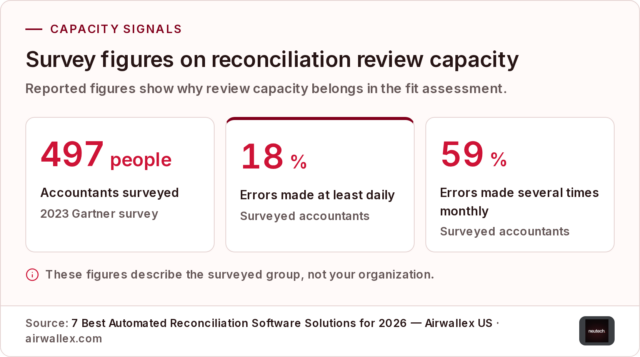
Capacity pressure deserves a measured response. A 2023 Gartner survey of 497 accountants found that 18% made financial errors at least daily and 59% made several errors per month, driven by capacity constraints. The figures describe the surveyed group, not your organization, but they show why review capacity belongs in the fit assessment.
Scale can also come from entities and accounts rather than raw transaction count. NetSuite states that MD Restaurant Group used its bank-reconciliation functionality to compare financials from 19 different entities. Treat that as a reported customer example, not as evidence that a particular system fits your entities. First document your accounts, entities, currencies, data sources, and approval obligations. Then decide whether the existing tool or a dedicated layer can support that scope.
Separate reconciliation scope by workflow type before comparing products. AP-payment reconciliation follows an invoice being paid, a bank file being matched, and the payment being posted to the general ledger. Card-spend reconciliation follows a card transaction being coded, posted, and matched to a receipt. A product that demonstrates AP-payment reconciliation has not, by that demonstration alone, shown fit for card-spend reconciliation. A product that demonstrates card-spend reconciliation has not, by that demonstration alone, shown fit for AP-payment reconciliation. List the records, matching steps, and approval owner for each workflow, then test each workflow separately. Different source records and matching steps can create different integration, exception, and approval requirements even when both workflows concern cash.

Map the workflow from source data to period close
A reconciliation workflow can gather inputs, match payments to invoices or purchase orders, confirm clearance, post to the general ledger, investigate exceptions, and close the period. Map those stages before comparing products. If you cannot explain what happens at each stage today, a new interface may organize the work without resolving the underlying control or data problem.
Use this sequence as a process map:
- Gather the inputs. Identify the bank statements, payment-provider records, ERP or general-ledger entries, billing records, invoices, purchase orders, and other source documents that belong in the process.
- Connect and import data. Reconciliation software can pull data from banks, payment processors, ERPs, billing systems, and internal tools. Confirm whether each connection is live, scheduled, file-based, or dependent on a manual export.
- Normalize the records. Feeds may use different formats, currencies, reference conventions, dates, and identifiers. A system can normalize those feeds into a common data model so records can be compared on consistent fields.
- Apply matching criteria. Rules can use amounts, dates, references, tolerances, and transaction relationships to identify records that belong together.
- Route unresolved items. Transactions that do not meet the configured criteria should remain exceptions for investigation rather than being forced into a match.
- Review and approve. Assign ownership, capture supporting information, review proposed actions, and obtain the required approval before posting or closing the period.
- Post and close. Post approved book-side entries, confirm that the relevant balances agree, and retain the record of what was reviewed and why.
Turn each stage into an observable requirement. For example, do not write only “supports integrations.” Specify the bank, processor, ERP, billing system, or internal tool that must connect; the fields that must arrive; the expected timing; and the person who owns failures. Do not write only “uses automation.” Specify whether the system can handle one-to-one, one-to-many, and many-to-many relationships, which tolerances apply, and where an uncertain item goes.
This map also reveals where a product ends. A matching engine may prepare a result, but your accounting policy, approval structure, journal-entry rules, and close calendar still govern what happens next. Keep the preparation step separate from the decision to accept an adjustment or close a control.

Test matching against the transactions that actually break
Exact matches are the easiest part of a matching demonstration. Your test should include the relationships that create investigation work in your process: partial settlements, grouped payouts, processor fees, foreign-exchange effects, missing references, and records that arrive on different schedules.
Matching engines can apply rules and tolerances across sources and support one-to-one, one-to-many, and many-to-many relationships. Automated payment matching can also handle exact, partial, many-to-one, one-to-many, tolerance, and unidentified cases. Layered logic may apply high-confidence matches first and progressively broader rules to complex cases. Configurable matching rules can therefore matter more than a simple auto-match label because they expose how varied transaction relationships and exception review are handled.
Build a test set with at least these categories:
- An exact amount-and-reference match.
- A partial settlement that leaves an open balance.
- One payment covering several records.
- One record settled through several payments.
- A grouped processor payout with fees or other deductions.
- A near match that should remain unresolved.
- A transaction with no usable reference.
- A record affected by currency or timing differences.
Test the boundary between a permitted tolerance and an unexplained difference. A tolerance rule can auto-clear a $3 short-pay against a $10,000 invoice without human review; items outside the configured rules can go to an exception queue or an AI-assisted suggestion. That example does not establish a suitable tolerance for your books. Ask who can configure the tolerance, what evidence is retained, whether the entry is written off or merely proposed, and how an override is reviewed.
The required result is not the highest apparent match rate. A transaction that fails the configured criteria should remain unmatched and be investigated rather than being forced into a match. During a demonstration, submit records with known outcomes and ask the system to show the rule, tolerance, source fields, and confidence boundary behind each result. If the explanation cannot be reconstructed, the match is not ready for automatic acceptance.

Make exception ownership part of product fit
Unmatched transactions are not a side queue. They are where your team spends judgment, and they can determine whether a reconciliation supports a timely close. Unmatched items can be routed to an exception queue with an assigned owner, aging, and supporting evidence. Stronger workflows group and enrich exceptions with context and proposed resolutions instead of leaving you with an undifferentiated list.
Define the exception operating model before you assess the interface:
- Ownership: Name the function or person responsible for the next investigation step. An open, unowned exception can fall between treasury, accounts payable, and bank-reconciliation teams when assignment rules are not explicit.
- Aging: Record when the item was created, how long it has remained open, and what escalation threshold applies.
- Context: Preserve the source records, related transactions, references, comments, and supporting documents that let you investigate without rebuilding the case.
- Resolution: Capture the action taken, the person who approved it, and the reason the item was closed.
- Reporting: Show open items, aging, status, and recurring causes so you can distinguish isolated breaks from upstream data or process problems.
Unresolved reconciliation exceptions can delay the financial close and require significant manual intervention. A platform can support labeling, commenting on, assigning, and resolving exceptions from one screen, while reporting can show status and results on a dashboard. Treat those capabilities as workflow requirements only when they match your ownership model and approval rules.
Ask for a live exception demonstration rather than a feature description. Create an unmatched item, assign it, add evidence, change its status, escalate it, resolve it, and retrieve the history. Then ask what remains visible to a reviewer after closure. Your boundary is clear: an item should not disappear merely because its status changed.
Verify controls and reconstructability
A reconciliation audit trail can record who acted, what they changed or approved, when it happened, which source records were affected, and why the action was allowed. Matching logs can capture the rule or tolerance that decided a match and whether a human forced it through. Exception trails can record how an unmatched item was assigned, investigated, and closed.
Evaluate the record as if another person had to reconstruct the period without relying on the original preparer. The minimum review questions are:
- What source records entered the reconciliation?
- Which rule, tolerance, or manual action produced each match?
- Which items remained unresolved, and who owned them?
- What changed, who approved the change, and why?
- Which evidence supported an adjustment or exception closure?
- Can you retrieve aging, resolution history, unreconciled items, and control reports on demand?
Document and attach evidence for open items, then have an independent person review and sign off on the reconciliation. That separation makes approval a visible step rather than an assumption.
Audit trails can break when matches lack recorded rules, exceptions lack closure reasons, or corrections overwrite original values. Test each failure mode directly. Create a match, change its inputs or rule, close an exception without a note, and make a correction. Then inspect whether the original value and the reason for the change remain available.
A bank-feed match is not necessarily a completed bank reconciliation. In QuickBooks Online, reconciliation requires the statement ending balance and a $0.00 difference. That distinction matters in any system: imported or matched transactions do not by themselves prove that the statement, ledger, reconciling items, review, and approval are complete.
Reconciliation logs, approval history, and access records can support an audit, but they do not replace a full SOC 2 program on their own. Treat the reconciliation record as one control artifact within the wider security, access, accounting, and compliance environment.
Control testing should examine the reliability of the data feed as well as the final reconciliation screen. A logged, timestamped synchronization can show how data moves from an ERP into a close tool. Request evidence that identifies the source, transfer time, destination, and any failed or incomplete transfer, then compare the imported population with the source population before relying on the result. Source-to-general-ledger lineage can help a reviewer re-perform a transaction path instead of accepting a summary balance. A synchronization log supports review of data movement; a synchronization log does not by itself establish that the underlying records are correct.
Separate automation capability from team responsibility
Automation changes the shape of the work; it does not remove the need for accounting judgment. Automated reconciliation software can move accountants away from matching lines by hand and toward investigating transactions that do not match. Execution-layer platforms can prepare matches, queue exceptions with proposed resolutions, and prepare draft journal entries for human review and approval.
Use unmatched volume to test the operating consequence. At 2,000 monthly transactions, a 10% unmatched rate leaves 200 exceptions, while a 2% unmatched rate leaves 40 exceptions. The 200 and 40 figures measure remaining items in the same 2,000-transaction monthly population. A lower percentage can still produce a workload your team cannot absorb, while a higher rate may be manageable at a smaller volume.
At low and moderate volume, a 75% to 85% auto-match rate can feel efficient, but the remaining unmatched transactions can create backlogs at scale. Set the operating target around high-confidence automation, visible exceptions, a reliable audit trail, and clean reporting rather than a blind attempt at 100% automation.
Assign responsibilities explicitly:
- The system prepares data, applies configured logic, and surfaces uncertainty.
- The reconciliation owner investigates breaks and gathers support.
- An authorized reviewer approves exceptions, adjustments, or journal entries.
- The control owner confirms that the process met the close and documentation requirements.
A demonstration is incomplete if it shows only the automated result. Ask what your team must review, what the system can propose, and what remains a human decision.

Compare approaches with an evidence file, not feature names
A vendor comparison becomes useful when every option runs against the same evidence file. Use records whose correct treatment is already known, draw a representative slice from closed periods, preserve the original exports, and label the expected results before any vendor or system runs the pilot. Do not allow a product’s output to become your answer key.
Your evidence file should include:
- Source coverage: Banks, payment processors, payroll platforms, ERPs, billing systems, entities, and currencies that the workflow must connect.
- Transaction patterns: Exact, partial, one-to-many, many-to-many, grouped, fee-netted, delayed, unidentified, and foreign-exchange cases that reflect your own records.
- Expected outcomes: The correct match, exception, adjustment, or review status for each test record.
- False-match checks: Records that look similar but must not be paired. A missed match creates visible work; a wrong match can make incomplete accounts appear finished.
- Control checks: The explanation for each match, uncertainty handling, exception history, access record, approval path, and reconstructable month-end output.
- Operating checks: Who configures rules, who owns exceptions, how changes are approved, and how results reach the ERP or other system of record.
Ask each provider or internal team to answer the same questions in writing:
- Does the matching engine handle your actual transaction volume, entities, currencies, and relationships?
- Does data move through relevant bank, processor, billing, and ERP connections without avoidable manual exports?
- Can rules, tolerances, exception routing, and journal-entry behavior be configured and reviewed?
- Does the system preserve payment-to-invoice context and produce a month-end record another person can reconstruct?
- What happens when a record is ambiguous, false, late, duplicated, or outside the rules?
- Which users can change logic, approve an override, or access regulated financial data?
A market comparison reports median annual contracts of about $15,000 for Numeric, $24,481 for FloQast, and $40,125 for BlackLine. Those are median annual contract figures reported for named products, not quotes for your scope and not a basis for ranking them. Keep commercial evidence separate from the control and workflow results of your own test.
Run a controlled implementation before expanding scope
Implementation readiness begins with the process underneath the software. Messy source data, inconsistent transaction IDs, undocumented matching rules, scattered workflows, and unclear exception handling can hold automation back. Document those conditions before you connect production systems.
Use a staged implementation:
- Scope access and security. Define the data required, limit access to read-only scopes where appropriate, review SSO, and complete the data processing agreement and security review.
- Connect and validate. Check opening balances, chart-of-accounts mapping, source completeness, and the tie-out between the imported data and the existing ledger.
- Pilot one entity. Start with high-volume cash and bank accounts for one entity, and run the new process in parallel with the old process.
- Set the exit criterion. Require both methods to agree for one close before expanding. Record open exceptions, review decisions, and any variance between the outputs.
- Extend by process and entity. Add further reconciliation processes and entities only after exceptions are reviewed and signed off and each entity’s ledger is reconciled.
- Retire and document. Remove old exports and templates only after the defined exit criteria are met, then update process documentation and control narratives.
Give every implementation stage an owner and an observable completion condition. The controller or reconciliation lead may own accounting outcomes, while security and technology teams may own access and connection review. The exact assignment is yours to define, but the handoff should be visible before data moves.
Monitor more than whether the system is running. Track connection failures, missing source records, unmatched items, aging, rule changes, overrides, approval completion, and differences between parallel outputs. Expansion should stop when those measures do not meet the agreed exit criteria. Retire the old process only when the new process is documented, reviewed, and operationally understood.
Set ingestion and review cadence as separate implementation decisions. Businesses traditionally performed bank reconciliations monthly, but modern accounting tools can support weekly or daily reconciliations; high-volume businesses may reconcile daily. Daily data ingestion can move matching work earlier in the period, but daily ingestion does not by itself determine the cadence for exception approval or period sign-off. Document the expected ingestion schedule, exception-review schedule, and close approval schedule so monitoring can distinguish a late feed from an unresolved accounting decision.
Set safeguards before relying on reconciled outputs
Start with the records and decisions that your process must protect. Use this preparation sequence:
- Document the workflow. List every source, transformation, matching rule, exception path, approval, journal entry, and close decision.
- Verify imported transactions. Check bank transactions against source documents. Payments should be compared with the relevant invoices, and check amounts should align with the check register or accounting records.
- Classify reconciling items. Bank-reconciliation adjustments can include deposits in transit, outstanding checks, missing direct deposits, bank interest, bank fees, and bounced checks.
- Investigate differences. When adjusted bank and general-ledger balances do not match, investigate the reason, check posted transactions, and look for errors such as transposed numbers.
- Obtain independent approval. The reconciliation process calls for a second person to review and approve or sign off on the reconciliation.
Do not force a reconciliation with a journal entry before identifying the root cause. A plug can conceal an underlying error or irregularity; investigate and correct the discrepancy at its source instead. Imported bank data also requires review because financial-institution errors, duplicate entries, missing deposits, or altered transactions can otherwise go unnoticed.
For a bank reconciliation, the adjusted ending balances are expected to agree with an unreconciled amount of $0. If they do not, stop the close path for that item and resolve the difference through the documented investigation and approval process. Do not alter financial records or rely on unreconciled outputs without appropriate review.
Build the cost model around scope and operating effort
Reconciliation software pricing spans very different operating models. A market cost comparison places self-serve tools at under $1,000 a year and enterprise platforms at more than $100,000 a year. A separate comparison places published-price tools at roughly $29 to $600 per month, while the cited enterprise close and certification platforms are quote-only and typically land in five or six figures a year, plus a one-time implementation fee and a multi-year commitment.
The self-serve figures are not contradictory: one source reports a broad annual range, while another describes published monthly plans. The same market comparison says self-serve tools with published plans, including Reconciles, cost $888 to $5,988 a year. Treat all of these as reported market examples from their respective comparisons, not as a budget for your implementation.
Build your estimate from the work and scope you will operate. Quote-only pricing can depend on modules, named users, entity count, and a negotiated implementation fee. Implementation services, internal time, integration work, renewal increases, and additional seats and entities can add to the software cost.
Request a cost model with separate lines for:
- Subscription or license charges by module, user, entity, and currency.
- Integration and data-connection work for banks, processors, ERP, billing, and internal systems.
- Configuration of matching rules, tolerances, exception workflows, and approval paths.
- Data cleanup, migration, testing, parallel operation, and implementation services.
- Internal finance, accounting, security, and engineering time.
- Support, training, monitoring, renewal changes, additional users, and future entities.
Then compare the total with the work you are actually removing or changing. A lower subscription can still require more internal handling, while a broader platform can create implementation obligations that your team has not staffed. Keep price, control coverage, and operating responsibility as separate decision columns.
Price benchmarks need a workflow match. Benchmark medians for close tools may say little about daily ACH, card, and Fed matching, and benchmarks that include many non-bank buyers may not represent a bank holding company with several charters. Use benchmark figures only as context, then request a quote tied to your transaction patterns, source systems, entities, currencies, users, and required controls. A low benchmark is not evidence that daily payment reconciliation will cost the same, and a higher benchmark is not evidence that the broader scope will be necessary. Keep the quoted scope and assumptions with the comparison record so later price changes can be traced to a changed requirement rather than treated as an unexplained increase.

Bring qualified review into material-risk decisions
Bring in qualified finance or accounting review when a discrepancy affects reporting, funds, journal entries, or the integrity of the close. Bring in qualified security or compliance review when the decision affects access to regulated financial data, control operation, audit evidence, or a regulatory obligation.
Escalate promptly when you cannot explain a difference, when an exception has no clear owner, when a correction would overwrite the original value, or when an automated result conflicts with source documentation. Preserve the source records, matching rationale, exception history, access history, and approval status while the issue is being assessed.
Do not treat a reconciliation log as a substitute for the wider control program. It can support review and audit activity, but material decisions still require the qualified people who hold responsibility for accounting, security, compliance, and financial reporting.
Turn the shortlist into a quote-ready project brief
Before you move from evaluation to delivery planning, assemble one brief that another team can price and review. Include:
- The reconciliation processes and close periods in scope.
- Every bank, payment processor, ERP, billing system, ledger, entity, and currency involved.
- Representative transaction patterns, including partial, grouped, fee-netted, delayed, unidentified, and exception cases.
- Matching rules, tolerances, approval boundaries, and the treatment of unresolved items.
- Exception owners, aging expectations, evidence requirements, and reporting needs.
- Security and access requirements, including read-only scopes, SSO, data-processing terms, and qualified review.
- Pilot data from representative closed periods, with expected outcomes labeled before testing.
- Parallel-run requirements, exit criteria, staged rollout boundaries, and monitoring responsibilities.
- Subscription, implementation, integration, internal-effort, renewal, user, and entity assumptions.
Use that brief to compare actual workflow behavior rather than feature names. A suitable approach is the one that connects the sources you need, explains its matching decisions, preserves exceptions, supports approval and audit evidence, and fits the people and controls available to operate it. Have a qualified professional decide individual accounting, financial, legal, regulatory, or compliance suitability where those responsibilities apply.
That record turns a shortlist into a bounded implementation decision.
What should a team verify before choosing cash reconciliation software?
What should a cash reconciliation software demo prove before a purchase decision?
It should run on representative records whose correct treatment is already known, including partial settlements, grouped payouts, fees, missing references, timing differences, and false-match cases. Require the system to show the source fields, matching rule or tolerance, uncertainty, exception path, approval history, and a reconstructable period-end record. A feature label or headline match rate is not enough evidence of suitability.
What happens when reconciliation software cannot match a transaction?
The item should remain unmatched and move into an exception workflow rather than being forced into a match. The workflow should assign an owner, preserve source records and supporting evidence, track aging, allow investigation and escalation, and record the resolution and approval. Unresolved exceptions may delay close, so define ownership and escalation rules before rollout.
What costs should be included when budgeting reconciliation software?
Include subscription or license charges, modules, users, entities, currencies, integrations, data cleanup, configuration, implementation services, testing, parallel operation, internal finance and engineering time, training, support, monitoring, renewals, and future expansion. Reported market examples available on November 20, 2026 ranged from under $1,000 annually for some self-serve tools to more than $100,000 annually for enterprise platforms; those figures are planning references, not a quote for a specific scope.
Does automated reconciliation software replace the accounting team?
No. It can shift accountants away from manually matching lines and toward investigating exceptions, reviewing proposed matches or journal entries, approving adjustments, and confirming that close and control requirements were met. Human responsibility remains necessary for judgment, source verification, approval, and handling discrepancies that fall outside configured rules.